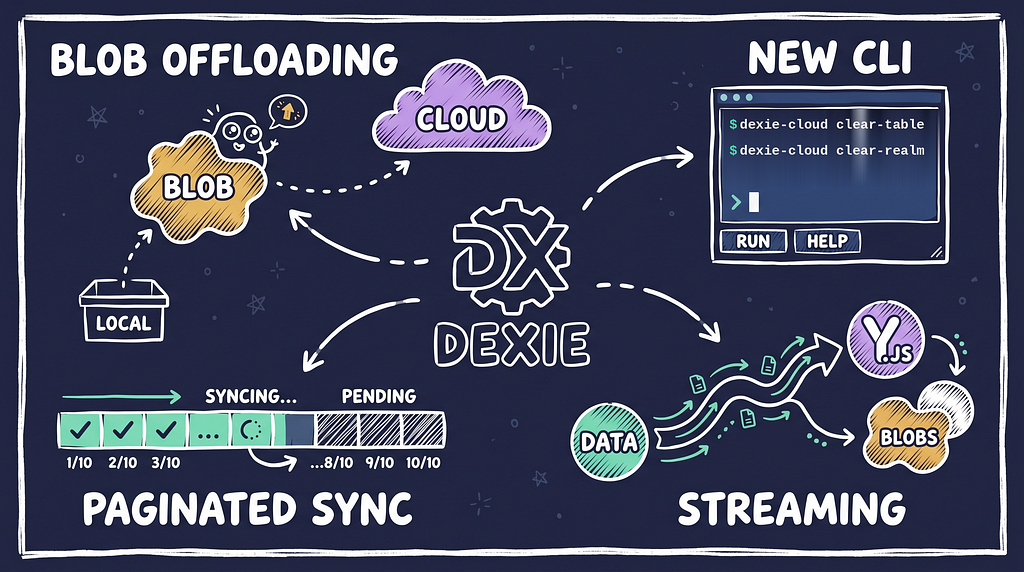
A lot has landed in Dexie Cloud over the past few weeks. Rather than writing deep dives about each piece separately, here’s a quick tour of what’s new — and a peek at what’s coming.
Blob offloading — our approach to storing large binary data outside the sync payload — has been running in production since earlier this spring. It’s been battle-tested against real apps with thousands of binary objects, and it works exactly as designed.
The idea is simple: when an object contains large binary data (images, PDFs, audio files, anything really), Dexie Cloud moves that data out of the sync stream and into blob storage (S3 or Azure Blob Storage). Only a reference remains in the synced object. Clients download blobs on demand, transparently. The sync protocol stays fast even when users have large attachments.
The dexie-cloud CLI has grown a handful of useful new commands:
All commands use all-or-nothing semantics: they validate that everything is in place before starting, rather than failing halfway through.
The dexie-cloud CLI’s export and import commands ( dexie-cloud exportand dexie-cloud import) now streams. Instead of reading the entire database into memory before writing a backup file, it pipes records through as they're read. This makes it practical to export large databases - a database that would previously cause an out-of-memory crash can now be exported reliably.
Two new format adapters landed alongside this:
The streaming format uses NDJSON (newline-delimited JSON), which makes it easy to process exports with standard tools — jq, shell pipelines, whatever you prefer.
To get the legacy format of an export, use the --legacyflag — it will use the old way and still works for smaller databases.
Our new Node.js SDK for Dexie Cloud is now published on npm as dexie-cloud-sdk. It's a server-side SDK - not a web library - built for backend code that needs to talk to your Dexie Cloud database directly via the REST API.
Three things it handles for you:
npm install dexie-cloud-sdkimport { DexieCloudClient } from 'dexie-cloud-sdk';
// Create the client
const client = new DexieCloudClient('https://dexie.cloud');
// restDB
const restDB = client.db("https://your-db.dexie.cloud", {
clientId,
clientSecret
});
// Query objects
const items = await restDB.data.list('todoItems');
// Add object
await restDB.data.create('todoItems', {
title: 'Buy milk',
done: false
});It’s designed for the use cases where the server needs to write too: seeding a product catalog, processing webhooks, running migration scripts. The same data your frontend syncs — accessible from Node.js, Deno, or Cloudflare Workers.
We’re actively working on paginated sync — a significant change to how initial sync works for clients joining a database for the first time.
Today, initial sync downloads all data in one go. For small databases this is fine. For large ones — thousands of records across many tables — clients can end up waiting a long time before they can do anything useful.
Paginated sync fixes this by fetching data in chunks, prioritizing what the user needs first, and filling in the rest in the background. The app becomes usable faster. Sync completes eventually, without blocking anything.
This is a significant protocol change, touching both the server and the client SDK. We’ll write a proper deep dive when it’s shipped. But as always, we value backward compability and always avoid upgrade enforcements or protocol changes — we always support old client → new server and new client → old server use cases.
—
That’s the spring roundup. As always, the best place to stay current is the Dexie.js releases page and dexie.org/docs. If you’re running into anything or have questions, find us on GitHub Discussions and our Discord server.
Dexie Cloud Spring Update: Blobs, Streaming, and What’s Next was originally published in Dexie.js on Medium, where people are continuing the conversation by highlighting and responding to this story.
© 2014-2025 Awarica AB
Browser testing via

Made with love for great people.
Read Terms & Conditions and Privacy Policy.