
Dexie Cloud Web Hooks
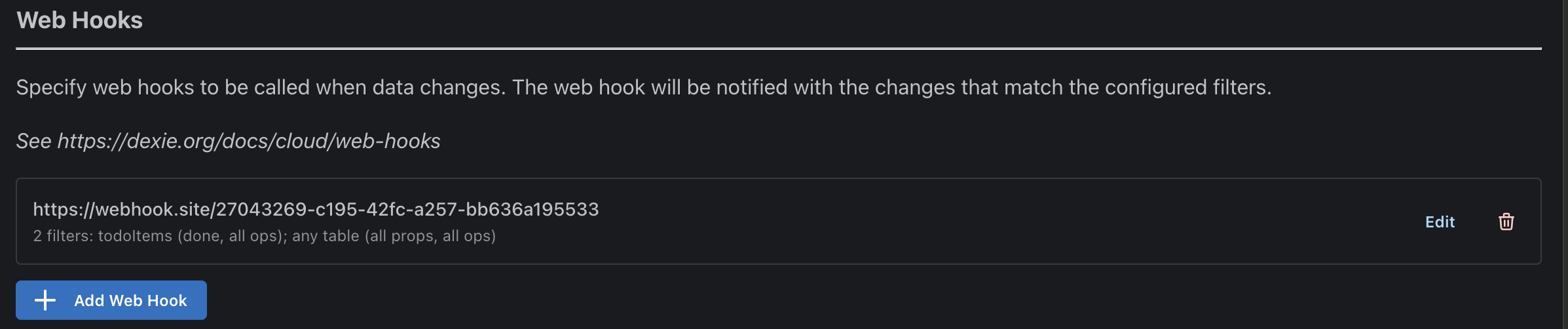 Screenshot from https://manager.dexie.cloud
Adding and Editing Web Hooks
Web hooks can be powerful to get notified when new changes arrive to the database via SYNC from a client or REST API access from a server. For example, a web hook might to things like sending an email or a push notification when a certain property on a certain table is changed. It can also be used for keeping an external system in sync with the Dexie Cloud database.
To create a new web hook, navigate to your database in Dexie Cloud Manager, scroll down to the Web Hooks section and click Add Web Hook button.
A web hook shall bee a public accessible URL that you provide such as an API endpoint in a nextjs app or a serverless function. Before implementing your hook, it is highly recommended to use webhook.site to laborate with this feature. There is no need to worry it would crash the sync procedure if the web hook fails to respond - web hooks are called separately from the rest of the flow in Dexie Cloud Server.
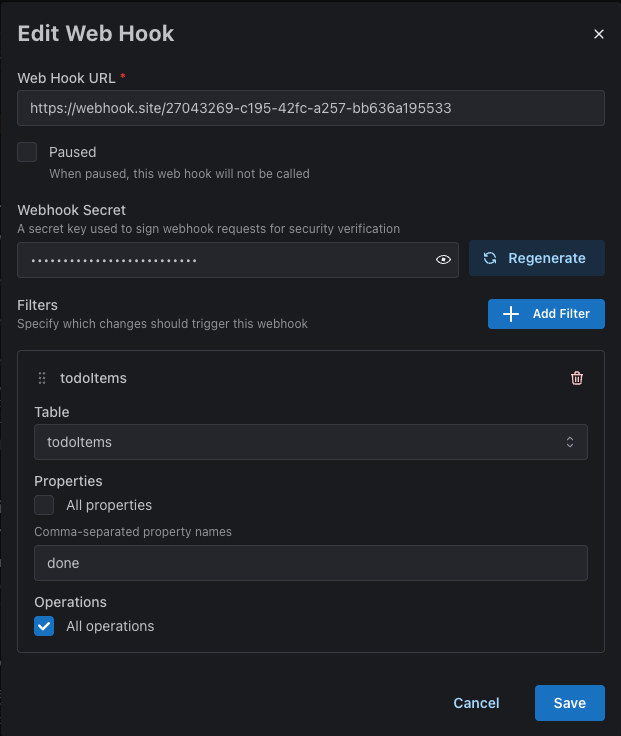
Properties of a Web Hook
| Webhook URL | The URL to your web hook |
| Paused | If checked, web hook will be inactive |
| Webhook Secret | A unique string to authenticate the request. Autogenerated or manual |
| Filters.Table | All Tables or selected table to trigger on |
| Filters.Properties | All properties or selected comma-separated list of props |
| Filters.Operations | All operations or selected operations only |
Webhook Secret
The web hook secret is by default a generated strong random string. Click the eye to reveal it and copy it into an ENV variable on by your web hook service. The secret will be provided in the "X-DexieCloud-Token" HTTP header of the POST request and your implementation should compare that header
against the configured secret.
Operations
| "upsert" | An object was created or replaced |
| "update" | An object was partially updated |
| "delete" | An object was deleted |
- Go to https://webhook.site and get your own unique URL to configure
- Configure the URL as a new Web Hook. Keep the default filter to catch everything, or narrow down which tables, props and operations it will trigger on.
- Save dialog
- Save changes in the database edit page.
- Use your application and trigger some change that syncs to Dexie Cloud and see watch the data flow to webhook.site
- Implement your real web hook and logic and reconfigure the web hook to POST to it instead.
Web Hook Request
-
HTTP Method: POST
-
POST Body type:
export type WebHookPostBody = { changes: SyncChange[] } export type SyncChange = | UpsertSyncChange | UpdateSyncChange | DeleteSyncChange export interface UpsertSyncChange { type: 'upsert' realmId: string table: string key: string value: object } export interface UpdateSyncChange { type: 'update' realmId: string table: string key: string updates: { [keyPath: string]: any } } export interface DeleteSyncChange { type: 'delete' realmId: string table: string key: string }Example:POST /api/mywebhook HTTP/1.1 Host: yourapp.yourdomain.com Content-Type: application/json X-DexieCloud-Token: 3IFLLLQAHGIN32PCETPWVG2E5A { "changes": [ { "type": "upsert", "realmId": "foo@bar.com", "table": "todoItems", "key": "tdi0Ph7h|YdzM77VzcMigVJrbRZcal", "value": { "todoListId": "tdl0PgXZPc1WWE1niV9fWmONB3Jcal", "realmId": "foo@bar.com", "title": "Hello", "id": "tdi0Ph7h|YdzM77VzcMigVJrbRZcal", "owner": "foo@bar.com", } } ] } POST /api/mywebhook HTTP/1.1 Host: yourapp.yourdomain.com Content-Type: application/json X-DexieCloud-Token: 3IFLLLQAHGIN32PCETPWVG2E5A { "changes": [ { "type": "update", "realmId": "foo@bar.com", "table": "todoItems", "key": "tdi0Ph7h|YdzM77VzcMigVJrbRZcal", "updates": { "done": true } } ] } POST /api/mywebhook HTTP/1.1 Host: yourapp.yourdomain.com Content-Type: application/json X-DexieCloud-Token: 3IFLLLQAHGIN32PCETPWVG2E5A { "changes": [ { "type": "delete", "realmId": "foo@bar.com", "table": "todoItems", "key": "tdi0Ph7h|YdzM77VzcMigVJrbRZcal" } ] }
Expected Response
Your web hook should take desired action and then respond with a code between 200-299 to indicate a successful recepience. If the hook fails to respond successfully, the framework will resend the data in an exponential backoff pattern.
HTTP/1.1 200 OK
Content-Length: 0
Updates Might Be Accumulated
There is no guarantee that every individual sync request will be represented by a corresponding POST request. The system might accumulate multiple syncs into a single POST request when the frequence of updates are faster than what the web hook may consume. For example, if thousands of clients syncs at the same time, the hook might receive a single or a few POST requets containing the accumulated array of changes. Also, if multiple updates are made on a single property, only the end result of the final
accummuated updates might be POSTed. However, the system will always be eager to POST as soon as possible (there is no built-in delay to wait for more syncs before posting).
Web hook for "new-user"
A Dexie Cloud database can be configured to let a web hook take decision on how to treat new (unknown) users. In Dexie Cloud Manager, in the section Policy for new users (See screenshot below), it is possible to configure a URL to a web hook so that a server-side end-point can be implented to integrate the application according to custom logic or directory lookup.
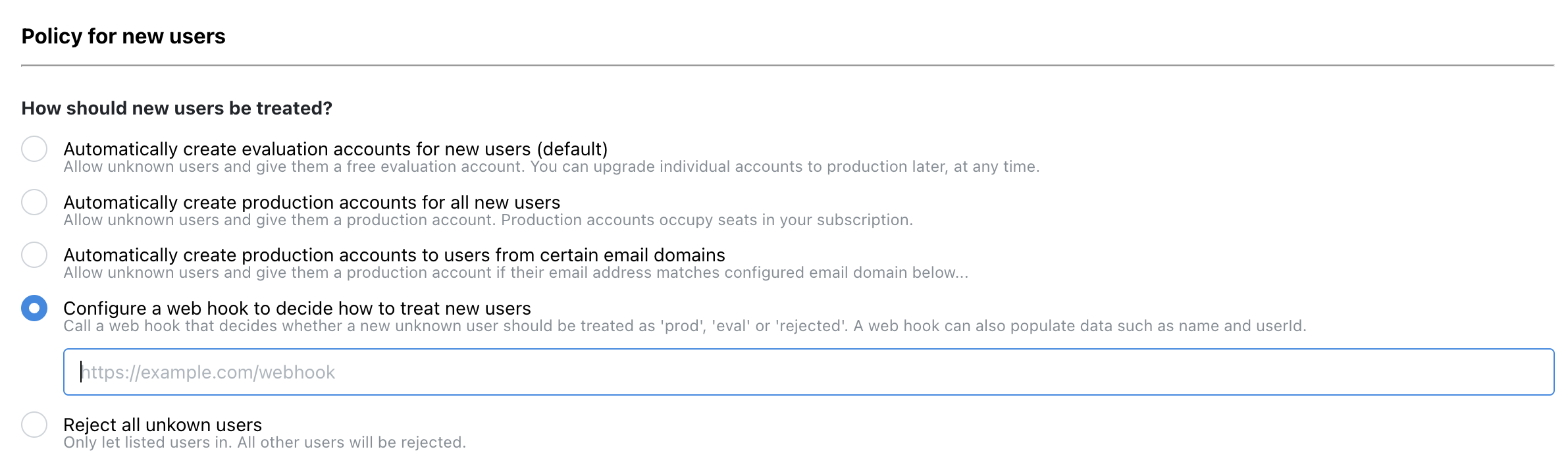
"new user" Request
When a user has been authenticated the very first time in this database, this hook will be called (if configured so in the 'Policy for new users' section of your database in Dexie Cloud Manager). A POST request will then be sent to the configured URL as described below.
-
HTTP Method: POST
-
POST Body type:
{ "userId": string "email": string }Example:POST /api/mywebhook2 HTTP/1.1 Host: yourapp.yourdomain.com Content-Type: application/json Content-Length: 54 {"userId":"foo@company.com","email":"bar@company.com"}
"new user" Response
Your endpoint need to respond in the following way:
-
Status Code: 200
-
Content-Type: application/json
-
Reponse Body Type:
{ "ok": boolean "action": 'reject' | 'eval' | 'prod' "userData"?: { "displayName"?: string "email"?: string [customProp: string]: any } }Example:HTTP/1.1 200 Ok Content-Type: application/json Content-Length: 27 {"ok":true,"action":"prod"}
If providing the optional "userData" property, it will be set as "data" property on the user (See users endpoint). The data property is also sent down to the client and accessible via db.cloud.currentUser observable on the client. The data property is a javascript object that can contain arbritary JSON compatible data. If data contains a property "displayName", this will be used as the user's name. If a custom authentication is used, an email address might not always be known when user is authenticated but can be applied by this hook by returning a data property with the "email" property within.
